
Pay structures differ by company and by grade. Define yours once. Define earnings, deductions and employer contributions, choose how each is calculated, and group them into salary templates.
Salary structure designer
Three kinds of component
Earnings, deductions and employer contributions.
Categories
Basic salary, allowance, bonus, commission, overtime, benefit, tax, retirement, insurance and other.
Three ways to calculate
A fixed amount, a percentage of basic, or a formula.
Default values
Set a default amount or percentage, such as house rent allowance at 40% of basic.
Statutory components marked
PF, ESI and professional tax are held as statutory components, with their own rates and history.
Salary templates
Group components into templates for a grade, a role or a kind of hire.
Switch on and off
Make a component active or inactive without deleting it.
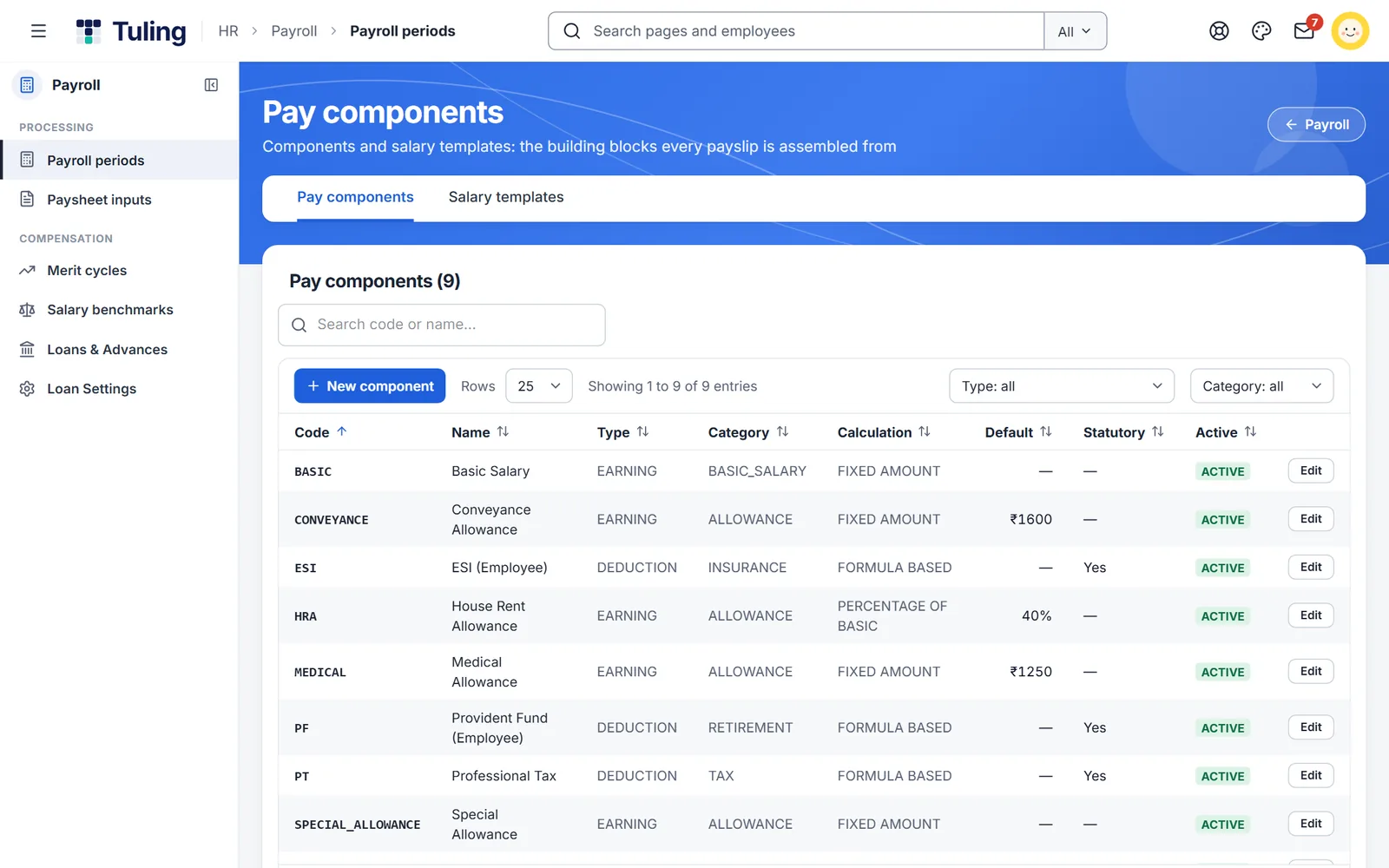
Pay components
Each component shows its type, category, calculation, default and whether it is statutory. Add a new component, or edit one that exists.
- Fixed, percentage of basic and formula-based calculation
- Statutory flag on PF, ESI and professional tax
- Search and filter by type and category
Three steps
Add components
Create the earnings, deductions and contributions you use.
Choose how they calculate
Set a fixed amount, a percentage or a formula for each.
Group into templates
Build salary templates and use them when you set pay.
More to build
Policy rules engine
Write your business rules as conditions, test them, and let the system apply them.
Learn more →Custom report builder
Start with 32 ready-made reports, then build, save and schedule your own.
Learn more →Payroll and compliance
PF, ESI, professional tax and TDS, with a dry run before anyone is paid.
Learn more →About salary structure designer
Are PF, ESI and professional tax ready-made?
Yes. They are held as statutory components, with rates and their history kept in the system.
Can I have different structures for different grades?
Yes. Use salary templates for each grade, role or kind of hire.
Can I change a component later?
Yes. Edit it, or make it inactive. Payroll runs after the change use the new setup.
Where does it connect?
Components feed payroll, payslips and salary changes.
See it built live
Book a walkthrough and we will set one up with you, using your own rules.