
Exceptions are where HR time goes. Turn them into rules. Define conditional rules for an area such as attendance exceptions, set their order, and test them against sample data before they go live.
Policy rules engine
Conditions you build
Combine conditions with all (AND) or any (OR), and group them for more complex rules.
Clear operators
Compare values with equals, not equals, greater than, less than, in and not in.
Rules in order
Give each rule a priority. Lower numbers run first.
A defined outcome
Each rule states what should happen when it matches.
Test before you rely on it
Paste a sample situation and see which rules would fire, without touching real data.
Rules by area
Keep rules for each area, such as attendance exceptions, separate and easy to find.
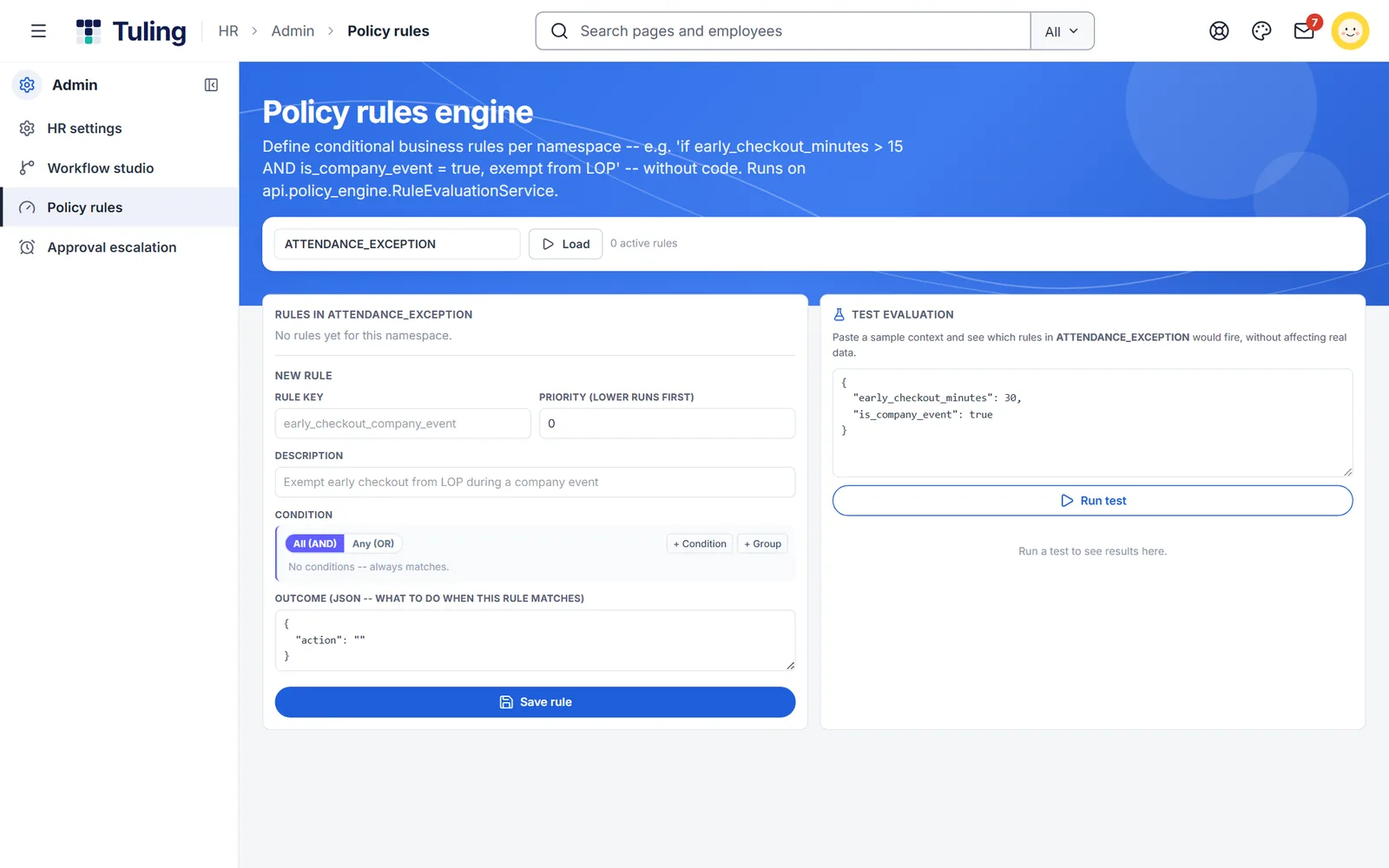
Build a rule, then test it
For example: if early checkout is more than 15 minutes and it is a company event, exempt the person from loss of pay. Build the condition, set the outcome, then run a test.
- Condition builder with AND, OR and groups
- Priority and description for every rule
- A test panel that shows which rules would fire
Three steps
Choose an area
Pick where the rule applies, such as attendance exceptions.
Build the condition
Add conditions and groups, and set the outcome and priority.
Test it
Run a sample case before the rule goes into use.
More to build
Custom approval workflows
Design who approves what, and in what order, without a developer or a vendor ticket.
Learn more →No-code leave policy designer
Design every leave type and rule yourself: accrual, carry forward, eligibility, blackout dates and more.
Learn more →Attendance and shifts
Punch from the phone, with shifts and geo-fencing for field teams.
Learn more →About policy rules engine
Do I need to write code?
No. You build conditions with clicks. The outcome of a rule is a short structured value that says what to do.
Can I check a rule before using it?
Yes. The test panel shows which rules would fire for a sample case, without affecting real data.
What if two rules match?
Rules run in priority order, lower numbers first.
Who can change the rules?
HR administrators can see and change rules. Employees and managers cannot.
See it built live
Book a walkthrough and we will set one up with you, using your own rules.